

Create stickers for Telegram
Apply filter effects to the image.After editing the sticker, you can add a stroke to the created sticker, after saving the sticker will be added to your sticker pack for telegram.You can add up to 120 of your stickers to one sticker pack and then easily export them to Telegram to use in chats and share them with friends.If you want to turn your photos into telegram stickers, this app will help you to do it easily.How to create your own stickers for Telegram?1.
Open Sticker Maker for Telegram2.
Select the Sticker Maker section3.
Choose a photo from the gallery or make it for your future sticker4.
Crop your photo5.
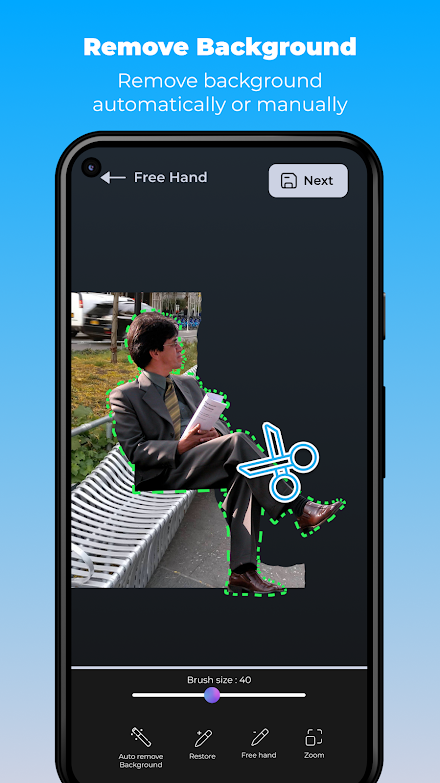
Remove background manually or automatically (Optional)6.
Add text with any font (Optional)7.
Add emoji or other sticker decorations (Optional)8.
Save your sticker.
The sticker will be added to the sticker pack9.
Click the Create button if you want to export your stickers to telegram.Dont want to create your own stickers?
You can choose stickers from a large set of ready-made sticker packs for Telegram.
Dozens of unique telegram stickers that you can add to telegram in a few clicks.Main features:- Create your Telegram stickers- Install ready-made stickers- Add effects to the picture- Automatic removal of the background on the sticker- Easy manual background removal- Large selection of fonts and colors for text- Cool stickers to add to the pictureOur telegram sticker maker will cover all your needs for editing and creating your own unique telegram sticker pack.
Creating stickers for Telegram has never been so easy.Create stickers for telegram and surprise your friends!
Do you want your own unique stickers for telegram?
This Sticker Maker for Telegram app is right for you!If you have any questions, our support email: [email protected]
About Create stickers for Telegram
- Package name (App ID)
- sticker.maker.fortelegram.create.telegram.stickers.tg.stickermaker.telegramstickers
- Available on
- Google Play
- Price
- Free
- Developer
- Newave Apps
Looking for the Create stickers for Telegram APK?
The safest way to get Create stickers for Telegram (sticker.maker.fortelegram.create.telegram.stickers.tg.stickermaker.telegramstickers) on your Android device is to install it directly from Google Play — you'll always get the latest official version, automatic updates, and no risk of modified or infected APK files from third-party sites.

Social Features
Connect and share with friends and the community.
Camera Features
Advanced camera features with editing capabilities.
Food & Dining
Discover recipes and order food from your favorite restaurants.
See Create stickers for Telegram in Action


Frequently Asked Questions
Is Create stickers for Telegram free?
Yes, Create stickers for Telegram is free to download and install on Android through Google Play.
How do I install Create stickers for Telegram on Android?
Open Google Play on your Android phone or tablet, search for Create stickers for Telegram by Newave Apps or tap the Google Play button on this page, then tap Install. The app downloads and installs automatically.
What is sticker.maker.fortelegram.create.telegram.stickers.tg.stickermaker.telegramstickers?
sticker.maker.fortelegram.create.telegram.stickers.tg.stickermaker.telegramstickers is the App ID (package name) of Create stickers for Telegram on Google Play. Every Android app has a unique package name, and it is the safest way to verify you are installing the official app.
Is Create stickers for Telegram safe to download?
Installing Create stickers for Telegram from Google Play is the safest option: you get the official version published by Newave Apps, verified by Google Play Protect, with automatic updates. Avoid APK files from unofficial third-party sites.

Get Create stickers for Telegram Today
Create stickers for Telegram for Android — free download on Google Play.
Compatible with Android phones and tablets — available on Google Play.
Ask AI about this app
Get instant answers about features, tips and more from popular AI assistants.